Step-by-Step Guide to In-Home Senior Care Services
Learn about Help Requests for one-time or ongoing help, plus how to post a request, view applicants, edit, and cancel
Written by
By Jill Tomasetti
Published
05 June 2025
Blog /
Arranging in-home help for loved ones, made simple
We’re making it easier than ever to find reliable in-home senior care on Herewith. Whether you live close to your family or long distance, it’s fast and easy to book trustworthy, affordable in-home senior care on Herewith.
What makes Herewith different from other senior care providers:
- Control over your care: Choose your own Helper & budget, only paying for the services you need
- Affordable & transparent pricing: Up to 50% cheaper than traditional agencies with no minimums or commitments
- Trusted & background-checked Helpers: Verified, insured professionals who enjoy working with older adults
- Stress-free booking: Easy online scheduling, live shift updates, and no hidden fees
How to book in-home senior care on Herewith’s easy online platform
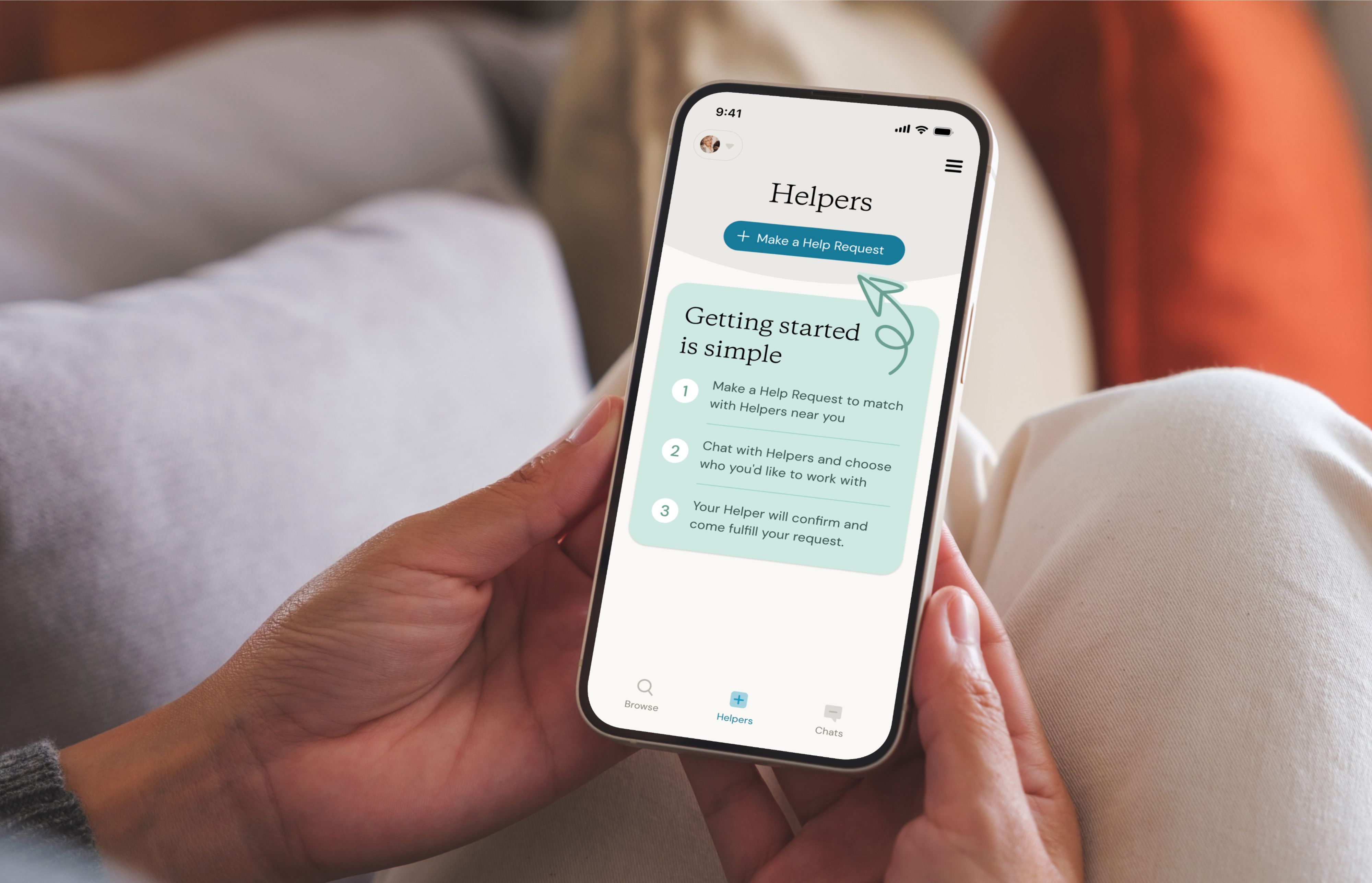
On Herewith, in-home care starts with a simple Help Request—basically a private job posting for insured, verified in-home caregivers on the Herewith platform. You get to specify all the details: What you need, when you need it, where it will take place, and how much you’re willing to pay.
The two types of Help Requests for in-home senior care
On Herewith, we make senior care as flexible as possible, and that starts with your schedule. With no hourly or weekly minimums, you can decide if you want to book a Helper just one time for help with a particular task or care need, or if you want to hire for part-time or full-time caregiving.
- One-time Tasks
One-time tasks are one-off requests, where a Helper comes over once for a set amount of time and provides help with a specific need. Choose from five popular categories of tasks, including Home Help, Errands, Tech Help, Companionship, and Caregiving Visits. - Ongoing Help
Select this option if you’re looking to hire a Helper to visit your or your loved one on a regular basis. You can customize your request to include scheduling details, hourly rate, and the recipient’s care needs to make sure you get the best support possible.
How do I make a Help Request?
To hire a senior care provider on Herewith, start with a Help Request. Once your request is posted, you can review applicants, chat with them, and book your favorite.
- Log in online or open your Herewith mobile app
- Navigate to the Helpers tab. You’ll see it on the left navigation panel on your computer or along the bottom of the screen on mobile
- Tap the blue + Make a Help Request button
- Select what type of caregiving services you need
- Add details to your request, including when you need help, what your budget is, your payment details, and specifics about the request
- Review your request then click or tap Post my Help Request for nearby Helpers to apply
Do I have to join Herewith to make a Help Request?
Yes, you’ll need an account—with no subscription fees and no commitments—on the Herewith platform in order to make a Help Request.
Learn more about in-home caregiving services on Herewith.
Review Helper applicants and choose who to book for in-home care services
- Navigate to the Helpers tab. You’ll see a red notification when there are new applicants for you to review.
- Scroll to the relevant Help Request and tap on it or review applicants by tapping on Review applicants
- Tap on each applicant to view their profile. From here you may also Book now, Message, or Reject applicant
- Tap Book now to select that Helper and confirm which Help Request you’d like them to fulfill. You may send the same offer to multiple applicants simultaneously. The first Helper to confirm will receive the booking.
Please note: The Helper must confirm the booking. If they do not confirm, you will need to book a different Helper for your Request.
- When a Helper confirms the booking, you’ll be notified via email and SMS. Then you’ll see the confirmed Help Request under your Helpers tab.
How to edit your Help Requests for in-home senior care on Herewith
How to edit one-time help requests:
You’ll have an opportunity to edit Help Requests for one-time tasks on the review screen before they are posted. If you need to make changes after you have posted the request, you can cancel and create a new request.
- Review your request details before posting
- Tap the Edit button on the review screen to make any changes
How to edit requests for ongoing help:
Ongoing help requests may be edited up until a Helper has accepted your hiring offer. Here's how to update your request for Ongoing Help:
- Go to the Helpers tab
- Click or tap on the ongoing help request you wish to edit
- Click or tap on the pencil icon in the upper right corner
- Choose which section you would like to edit and tap Edit
- Review and confirm your edits by tapping Save
How to cancel a senior care Help Request on Herewith
- Navigate to the Helpers tab. You’ll see it on the left navigation panel on your computer or along the bottom of the screen on mobile
- Click or tap on the relevant Help Request
- Click or tap Cancel this Request at the bottom of the page
- Any applicants will be notified that the request has been canceled
Herewith Cancellation Policy for in-home senior care
If your Help Request has not been booked, you may cancel it at any time.
If you have already confirmed a one-time task booking with a Helper, you may cancel at no charge up until 3 hours prior to the scheduled Help Request. If you cancel within 3 hours of the booked request, you will be charged a prorated amount equal to one hour (at the rate specified in your booking).
If you have already booked a Helper for your request, please be courteous and cancel as far in advance as possible. If you wish to reschedule the request with the same Helper, you can discuss it over chat and send the Helper a new Help Request.
Still need help?
Call our Support team for further assistance.
Mon-Sat, 9AM-6:30PM PT- Call us at:
415-506-9776
- Send us an email
support@herewith.com





Herewith provides a platform to assist Helpers and care recipients in connecting regarding in-home non-medical care opportunities. Herewith does not employ any Helpers, nor does it recommend any Helpers and/or care recipients who use its platform. User information provided in profiles, posts, and otherwise on the Herewith platform is not generated or verified by Herewith. Each user of Herewith's platform is responsible for conducting their own vetting before determining whether to enter into an employment relationship and for their own conduct, including compliance with applicable laws.