Applying for Senior Care Jobs on Herewith: A Step-by-Step Guide
Find out how to apply for senior care jobs, manage your job search, chat with clients and accept offers as a Helper
Written by
By Jill Tomasetti
Published
20 March 2025
Blog /
How to apply for senior care jobs on Herewith
Herewith is a free platform where you can create an account as a Helper and apply to senior care jobs called “Help Requests,” posted by families and older adults. Applying starts with creating your Helper profile, and is fast and easy.
You can browse jobs by logging in online, or download the Herewith Helper mobile app to stay on top of your job search, applications, messages, and offers on the go! Find the Helper app on the App Store or the Google Play Store.
Step-by-step guide to caregiver job applications on Herewith
Before you can apply for senior care jobs on Herewith, you’ll need to create an account and fill out your Helper profile. It usually takes Helpers around ten minutes to complete—and you can always take breaks and come back later if you need to. Your progress will be saved.
After your profile is all set up, you’re ready to start applying! You can apply to as many jobs as you want, searching by zip code and other filters to find exactly what kind of jobs you want.
How to get started applying for senior care jobs on Herewith:
- Create your Helper account using Google, Facebook, Apple, or your mobile number to sign in
- Fill out your Helper profile information, including your free caregiver background check
- Go to the Browse tab to scroll through jobs and tasks near you
- Tap Apply to the ones you like
How to check on your applications:
- Go to your Applications tab to see what tasks/jobs you’ve applied to
- Check your Chats tab to see if any clients have messaged you with questions about your application
- Check your notifications (you can check these in the mobile app or in your email) to see if you’ve received any job offers
As families review your applications they'll send you a few messages on the app. Usually they’ll ask about your job experience, your caregiving skills, and your availability. You can ask any questions you have as well, to make sure it’s a good fit for you.
When they’re ready to hire, families will send you an offer which you can choose to accept or decline. This will confirm your booking.
In-home care job requirements for Helpers
On Herewith you’ll find job opportunities for a range of skills and experiences, but the most important thing is that you enjoy working with people and helping others.
Qualities that many families look for in their caregivers are patience, caring for others, good communication, and friendliness. Many Helpers started out by caring for their own family members or neighbors. Experience as a professional caregiver, certificates, and skills like first aid training are a bonus that can help you earn more per hour.
While job requirements may change for each different client, on Herewith you’ll find the requirements for becoming a Helper are simple and easy:
- Create your Helper profile
- Add your profile photo and a couple sentences introducing yourself as a caregiver
- Add your skills and experiences
- Complete your caregiver background check
For more details, check out our tips on creating a successful Helper profile.
What kind of senior care jobs are available on Herewith?
On Herewith, clients can request help with many different types of senior care services. They’ll fill out a Help Request with everything you need to know in order to apply.
Help Requests are essentially job postings on the Herewith platform. It’s where families share what kind of help they are looking for, whether it’s a one-time task or an ongoing job, how much they’re paying, and when it starts.
There are two types of Help Requests on Herewith—one-time tasks and ongoing jobs (this include part-time and full-time). You can apply for any and all Help Requests that appeal to you and work with your schedule!
One-time Senior Care Tasks:
For a one-time task, you go to the client’s residence once for a set amount of time and provide help with a specific need. On the Help Request, you’ll see which type of help the older adult needs: Home Help, Errands, Basic Tech Help, or Companionship.
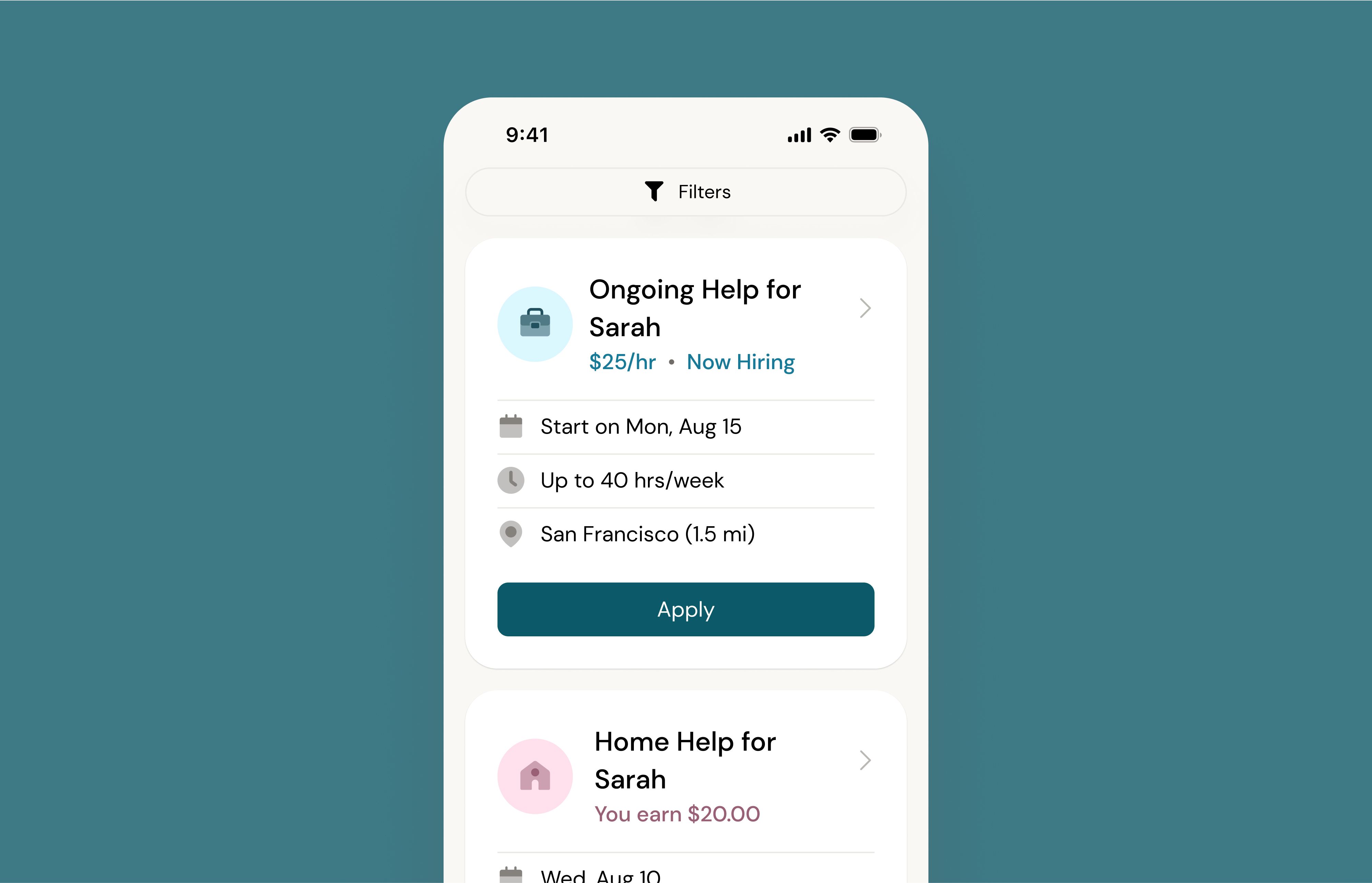
Help Requests for one-time tasks have a pink icon and a label at the top that tells you what type of task it is. Under that, you’ll see the total amount the family is paying for that task, followed by other details. The task card will be updated with the full worksite address once you’ve been booked. If you’re interested, you can tap the Apply button.
Ongoing Senior Care Jobs:
For this type of request, the client wishes to hire a Helper on a regular basis for help with a variety of tasks. Tap or click on the request to see more details, including schedule, hourly rate, and what they’d like you to help with. Ongoing jobs can be part-time or full time, so check out the details to make sure the schedule works for you.
Help Requests for ongoing jobs have a blue icon and a label at the top that tells you if it’s a full time or part-time job. Under that, you’ll see the hourly rate, followed by other job details. The task card will be updated with the full worksite address once you’ve been hired. If you’re interested, tap the Apply button.
How to filter your caregiver job search
When you’re applying for jobs, you want to find the best opportunities for you! As you browse care jobs on the Helper platform, there are a few ways to filter and sort your job search.
Step-by-step instructions for filtering and sorting caregiving jobs in your area:
- Log in on the web or open your mobile app and go to the Browse tab
- Tap the Filters icon at the top of the page
- Select your filters by tapping on different job or task types
- Change the location of your search by entering a different zip code at the top
- Sort your results by distance, pay, or number of hours
- Tap Apply to see your updated results
How to check on your caregiver job applications
Since jobs and tasks are all posted by different clients, the timing of when clients respond to your application will vary. Some clients may be looking for help ASAP and will make a quick decision. Others may take their time and send messages to several different Helpers to chat and find out if you’re a good fit.
While you’re waiting for messages and job offer notifications, you can always check the status of your job applications under the Applications tab. Jobs that have been filled or have expired will be tagged as such. If a job doesn’t have a tag that means the client hasn’t hired a Helper yet.
We recommend keeping an eye on your Chat notifications, as most families will reach out with some questions before deciding who to hire. When you do receive an offer for a job or task, you’ll receive a text SMS message and an email letting you know so you can respond right away.
Get more tips on how to be a successful caregiver and advice for your first day as a Helper on Herewith.
Still need help?
Call our Support team for further assistance.
Mon-Sat, 9AM-6:30PM PT- Call us at:
415-506-9776
- Send us an email
support@herewith.com





Herewith provides a platform to assist Helpers and care recipients in connecting regarding in-home non-medical care opportunities. Herewith does not employ any Helpers, nor does it recommend any Helpers and/or care recipients who use its platform. User information provided in profiles, posts, and otherwise on the Herewith platform is not generated or verified by Herewith. Each user of Herewith's platform is responsible for conducting their own vetting before determining whether to enter into an employment relationship and for their own conduct, including compliance with applicable laws.