Managing Your Herewith Account Settings: A Quick Guide
Learn how to change your notification settings, update your contact info, and manage your Herewith account preferences
Written by
By Jill Tomasetti
Published
14 March 2025
Blog /
Where to find your Herewith account settings
At Herewith we do our best to make our senior care platform easy and user-friendly. Whether you have downloaded the Herewith mobile app on your phone or if you prefer to log in on the web, you can easily access your account info anytime.
Simply look for My Account or the menu icon. From here you can update your personal details and contact info, access the Help Center, check your notification and sign-in settings, and sign out.
Managing your Herewith account preferences: Contact info
On Herwith, you’ll use your email address and phone number to sign in and manage your account. However, if you need to change either of these other other details, such as a last name change, you can access those details in the account menu at any time.
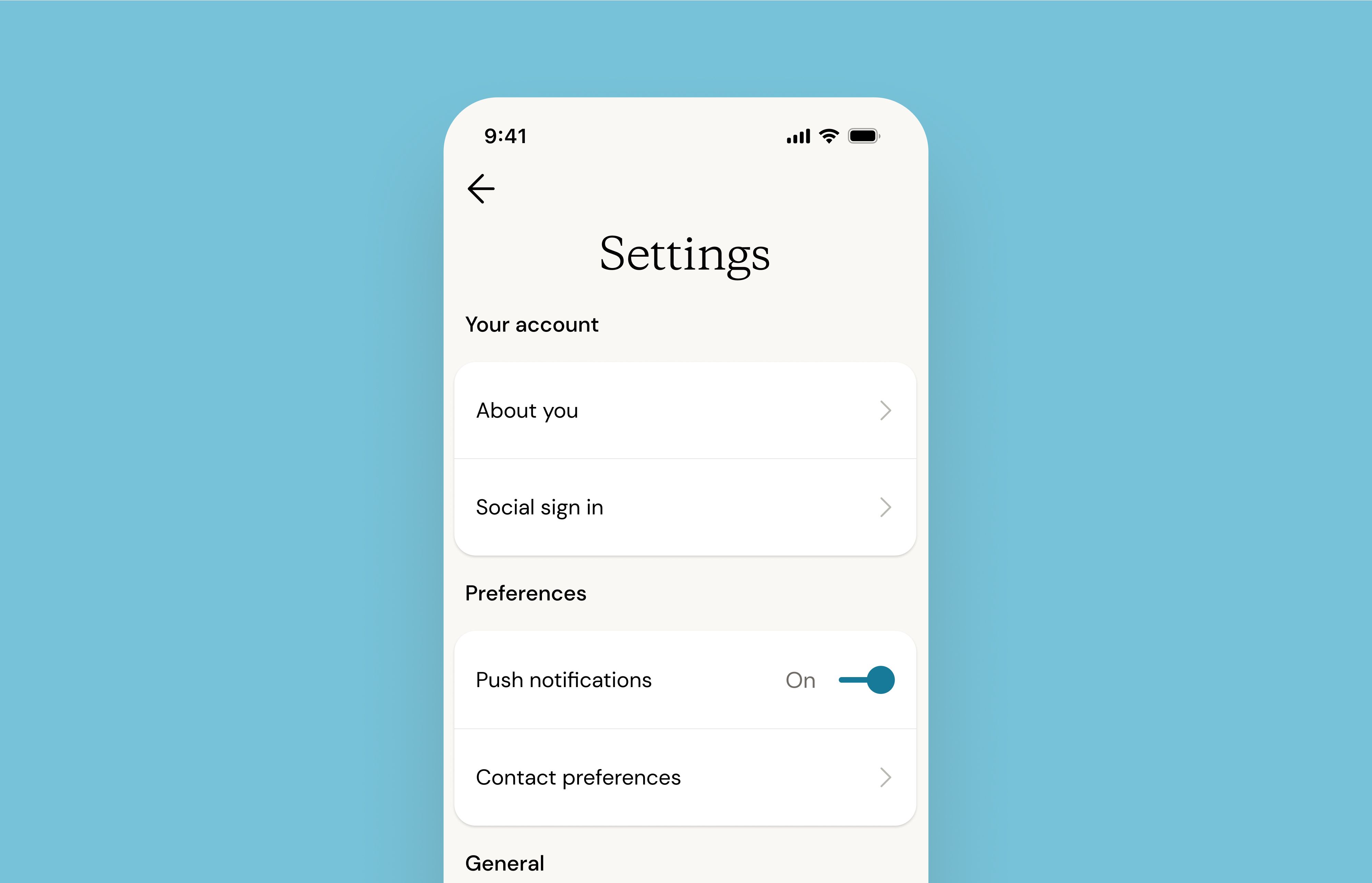
- Log in to Herewith and click or tap My Account (or hamburger menu on mobile)
- Click or tap Settings > then About you
From this page you can update and edit your name, phone number, and email address.
Managing your Herewith notification settings
Check to make sure you’re receiving in-app notifications, live shift updates, and payment information in the Account Settings menu.
- Log in to Herewith and click or tap My Account (or hamburger menu on mobile)
- Click or tap Settings
- Click or tap the push notification toggle on or off
Please note: For real-time notifications on your bookings, chats, and payments, it’s recommended to toggle your push notifications on.
What kind of notifications does Herewith send?
If you have downloaded the Herewith mobile app on your Android or iPhone, you will receive push notifications on your phone’s home screen and SMS messages. If you haven’t downloaded the mobile app, you will only receive text SMS messages.
For some types of notifications, such as booking or hiring confirmations and receipts, you will also receive emails, whether you are using the mobile app or the online portal. Check the email address you used to create your Herewith account for all email notifications and receipts.
Does Herewith offer Customer Support?
Yes, You can reach our live customer support team Monday-Saturday, 9AM-6:30PM PST at 415-506-9776. Or you can email us at support@herewith.com
What can Herewith Customer Support help with?
Our Customer Support team is there to help you, wherever you are in your in-home care journey. Give us a call if you have questions about Herewith, if you come across any technical difficulties, or if you’d just like a little help signing up or booking your first Helper.
How do I close and delete my Herewith account?
If you are no longer in need of services from Herewith, you can close and delete your Herewith account by going to My Account > Settings > Delete Account.
Still need help?
Call our Support team for further assistance.
Mon-Sat, 9AM-6:30PM PT- Call us at:
415-506-9776
- Send us an email
support@herewith.com





Herewith provides a platform to assist Helpers and care recipients in connecting regarding in-home non-medical care opportunities. Herewith does not employ any Helpers, nor does it recommend any Helpers and/or care recipients who use its platform. User information provided in profiles, posts, and otherwise on the Herewith platform is not generated or verified by Herewith. Each user of Herewith's platform is responsible for conducting their own vetting before determining whether to enter into an employment relationship and for their own conduct, including compliance with applicable laws.